
My X feed has split into two camps.
The first one says the problem is solved. “sometime in the last 3 months all the top engineers stopped reading code and went up an abstraction level,” wrote Andrew Pignanelli on Nov 14. That post has about 1,800 likes. Under it and around it are a lot of people saying the same thing about themselves. Some of them are probably right about their own projects. A lot of them are describing a software factory: agents write the code, other agents review it, and nobody looks.
The second camp is quieter and busier. It’s building ways to check agent code that don’t depend on anyone reading every line.
I’m in the second camp. I don’t read every line anymore. I don’t think “don’t read the code” follows from that. What follows is that you have to pick what you read. So I tried to find out what the useful thing to read actually is.
The garden, not the factory
On Nov 20 I wrote about Lauren Tan’s pstack and poteto mode. Two weeks before that she posted a short take that I keep coming back to:
hot take: you don’t need a software factory, and i don’t love the term. it’s just marketing
all you need is good software engineering and investing your tokens in the right places. the more deterministic the better (and token efficient)
That’s her post from Nov 6. It has about 8,000 likes. The image attached to it is an upside-down pyramid that shows where to spend effort around your agents, with the widest layer first:
| Layer | What she puts in it |
|---|---|
| codebase | good api design, architecture, refactoring |
| static analysis | lints, types, compilers, tests, ci |
| verification | formal, empirical |
| prose | rules, skills, AGENTS.md |
| human review | (the small tip at the bottom) |
In her AI Engineer talk she explains the shape. In the talk transcript, the first two layers are “deterministic.” They limit what an agent can write in the first place. Verification checks the properties and invariants you want to hold, and whether the agent understood what you meant. Prose comes last. Then she says the line this post is named after: “the analogy that I like to use is that your codebase is kind of like a garden.” Whatever is already in the repo, including the weeds, is what the next agent copies.
She also says her team’s code review “has now really shrunk into looking at verification artifacts instead. So things like videos, screenshots, diagrams, formal verification.” She names the tools: TLA+ for model checking user flows, Lean for proving algorithms, and Bombadil for property-based UI testing. She also mentions a /statechart skill in pstack that draws “state machines from the user’s point of view.”
That’s the part I wanted to test. Human review is the tip of the pyramid. It doesn’t disappear. If what I review is a diagram plus a proof, does it catch what I’d otherwise catch by reading the diff? And does it catch more?
What people on X are using
Before running anything, I went through what people on X are actually using to keep agent code clean, as opposed to what they say. The deterministic tools got the most traction. Bigger rules files got the least.
| Tool | What it does | Layer |
|---|---|---|
| Bombadil (Antithesis) | You write properties that must always hold. It clicks around a real browser looking for a state that breaks one | verification |
/statechart + /create-formal-verification-skill (pstack) |
TLA+ model, checked by TLC, drawn as a Mermaid statechart with the shortest path to each broken rule | verification |
/correct and /no-comments (pstack) |
Turn a correction into a check. Ban the comment that excuses a workaround | static analysis |
| ub-mode (Uncle Bob) | A skill paired with gates: CRAP score, duplication, mutation testing | static analysis |
| shrink-anything | Deletes dead code, files and deps, and keeps each cut only if your tests still pass | codebase |
| hunk | Terminal diff viewer that shows the agent’s notes next to the hunks they explain | human review |
Two more things kept coming up. People run mutation testing (Stryker, mutmut, cargo-mutants) on just the lines the agent changed, because agent-written tests tend to pass no matter what. And Lauren herself called adversarial agent reviews “mostly a waste of tokens” next to empirical and formal checks. That’s the factory’s favorite move, and she’s moving away from it.
The experiment
I wanted something small enough to finish in a day, with enough state to hide bugs. I wrote a phntm-style ticket (trimmed here):
- You pick a file. Press Send: it's encrypted (~1s), then uploaded with a progress bar.
- Show a share link when the upload finishes.
- Cancel is available while encrypting or uploading and returns you to the start.
- The fake network fails about 30% of uploads. Show an error with a Retry button.
- The link expires after 8 seconds in this demo. Then show "Send another".
- Only one upload at a time.
My bot wrote app.js in one pass: 123 lines of plain JavaScript, a fake backend built from setTimeout and setInterval, no framework. It looked fine. In the old world I’d read all 123 lines. This time I asked for two more things.
A proof. Four lines of the ticket became Bombadil properties, read off the page and not out of the code:
// "Cancel ... returns you to the start." The start is only left by you picking a file.
export const startOnlyLeftByPicking = always(
  now(() => phase.current === "idle")
    .implies(next(() => ["idle", "ready"].includes(phase.current))),
);

// "Only one upload at a time." One upload moves the bar 10% per tick, never more.
export const oneUploadAtATime = always(() => {
  const p = progress.current;
  return now(() => phase.current === "uploading").implies(
    next(() => phase.current !== "uploading" || progress.current - p <= 10),
  );
});
There are four properties, 29 lines in total. That’s a file I’ll actually read, because each property says one sentence from the ticket.
A chart. The same rules became TLA+ invariants over a model of the code. Each timer is a count of callbacks still waiting to fire, because app.js keeps one handle per timer and clearTimeout only stops the newest one. Then pstack’s /statechart checked it with TLC and drew it:
YouCancel == phase \in {"encrypting", "uploading"}
  /\ enc' = Dec(enc) /\ up' = Dec(up) /\ phase' = "idle" /\ file' = FALSE
  /\ UNCHANGED <<exp, link>>

NothingRunsAfterCancel == phase = "idle" => (enc = 0 /\ up = 0)
OnlyASentLinkExpires   == exp > 0 => phase = "done"
What the chart said
TLC took 2.8 seconds. It reached 246 states, and all four rules broke. The report gives each one as the shortest path a user could take, written in plain words:
## NothingRunsAfterCancel breaks
The shortest path has 4 steps:
0. Start
1. you pick a file: File picked
2. you press Send: Encrypting
3. you press Send: Encrypting
4. you press Cancel: Start
Press Send twice and you’ve started two encryption timers. Cancel stops one of them. A second later the other one fires and the panel starts uploading a file you cancelled. Nothing in the code looks wrong on its own. send() is nine lines and cancel() is eight. The bug is in how they interact over time, and that’s exactly what a skim misses.
The chart showed me something I hadn’t expected. After the fix, the chart has 7 states and 15 arrows, and I’d sign off on every one. The chart of the code as written had the same 7 states and 39 arrows.
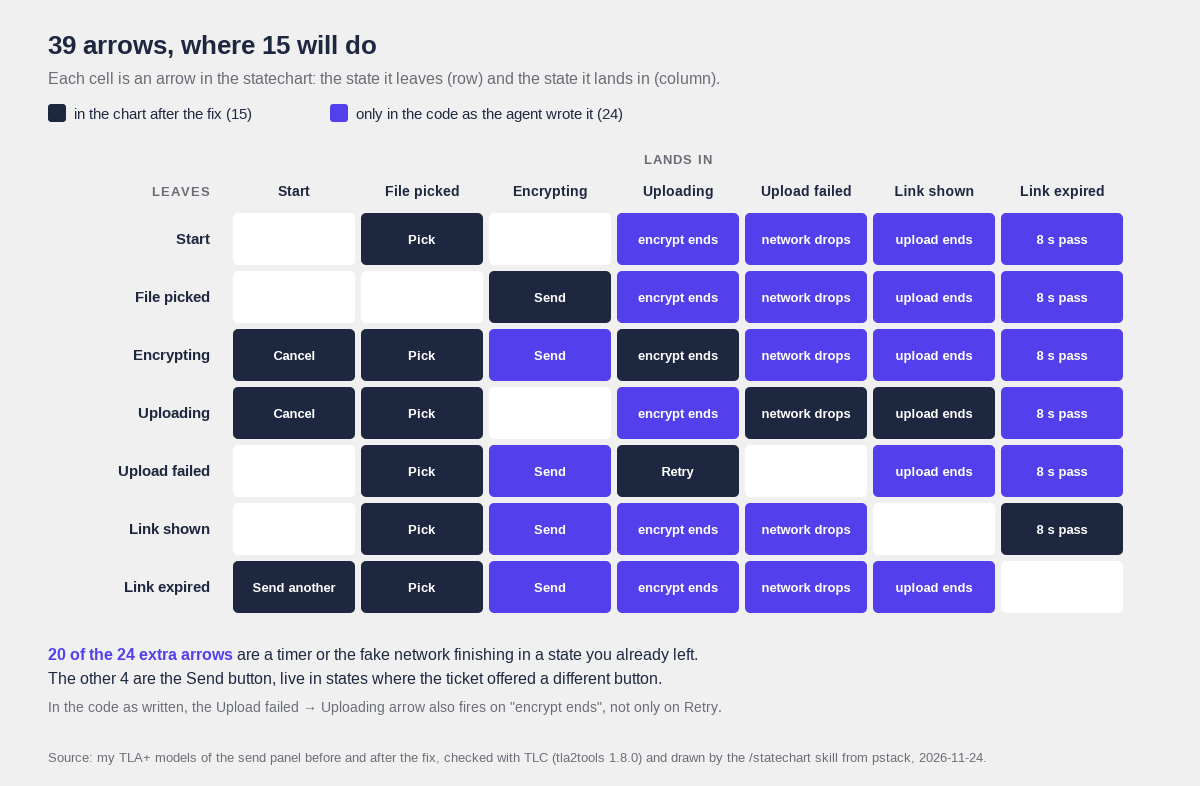 Every purple cell is behavior nobody asked for. 20 of them are a timer finishing in a state the user already left. Source: my TLA+ models before and after the fix, drawn by pstack’s /statechart.
That’s the review, right there. I didn’t need to trace setInterval in my head. I looked at “Start → Upload finished” and knew it was wrong, because I know what the product is supposed to do and the agent doesn’t. Lauren made the same point on X: statechart “lets you visually verify that it’s correct since only you know what your product is supposed to do.”
What the browser said
The model is a model. It describes the code, and the code is what ships. So Bombadil ran the four properties against the real page in headless Chrome for 150 seconds, about 4,000 clicks and reloads.
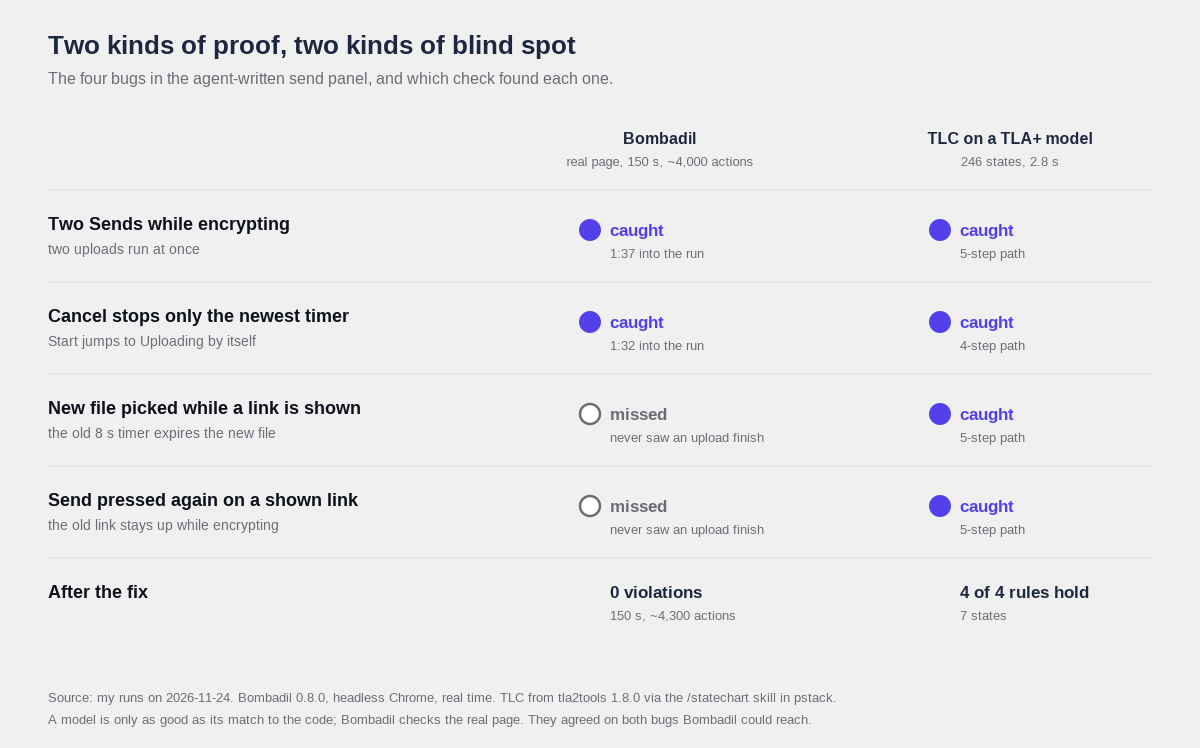 Bombadil and the model agreed on every bug Bombadil could reach. Source: my runs on 2026-11-24.
It found the cancel bug at 1:32 and the double upload at 1:37: the progress bar jumped from 0 to 20 in one tick because two intervals were running. Both were real and in the shipped code. That’s also why I trust the model: the two checks agree.
It missed the other two, and the reason is worth knowing. Both need an upload to finish, which takes 2.5 seconds without anyone touching anything. Bombadil clicks every 30 milliseconds or so. In 150 seconds it never once saw a link, a failed upload, or an expired one. Random clicking is great at impatient users. It’s bad at patient ones. The model doesn’t have that problem, because to TLC “8 seconds pass” is just another event.
I also tried Chrome’s virtual time to make Bombadil wait faster. It reported 639 violations, and all of them were mine, not the app’s. Virtual time squashed encrypt, upload and expiry into one observed step, and my next-state properties read that as a jump the ticket doesn’t allow. The proof is code too, and it needs reading.
The fix, and what I actually read
The bot’s fix gives every timer callback a run number, and anything that starts over bumps the run:
let run = 0;
function stopEverything() {
  run++;
  clearTimeout(encryptTimer);
  clearInterval(uploadTimer);
  clearTimeout(expiryTimer);
}
// ...and every callback starts with: if (mine !== run) return;
It also only enables Send in the File picked state. After the fix, the chart is down to those 15 arrows. TLC finds 7 states and all four rules hold. Bombadil ran another 150 seconds, about 4,300 actions, with 0 violations.
So here’s what I read compared with what I’d read line by line:
| Line by line | What I read | |
|---|---|---|
| The feature | app.js, 123 lines |
the 4 properties, 29 lines |
| The behavior | traced in my head | the chart: 7 states, 39 arrows, then 15 |
| The bugs | hope I spot them | 4 shortest paths, 4 to 5 steps each |
| The code | all of it | send() and cancel(), 17 lines, because the paths pointed there |
| The fix | 30-line diff | the chart again |
On a 123-line file the saving is small, and I’m not going to pretend otherwise. What matters is the shape. The rules and the chart grow with the behavior, not with the code. A feature with ten times the code and the same seven states gives me the same chart to read.
What I didn’t skip: the TLA+ model. It’s 53 lines, and if it doesn’t match the code, the chart is fiction. I trusted it because Bombadil found the same two bugs on the real page. That’s the deal. The proof that touches the real thing keeps the abstract proof honest.
The weed
Every one of the four bugs was a timer that kept running after its moment was over. Lauren’s talk has a whole section on this. On Cursor, agents loved setTimeout and requestAnimationFrame as quick fixes, then wrote comments explaining why each one was fine, and the timers spread. Her answer wasn’t a better review. On her team they banned most comments and wrote lint rules whose error messages send the agent to the root cause instead.
The bot’s fix even came with a comment explaining the run counter. In a garden, that comment is the weed. It’s the next agent’s permission slip.
A factory would ship this panel and send a reviewer agent after it. In a garden, you read the chart, fix the bed, and then put up a fence: a lint rule that bans a bare setTimeout outside a run-scoped helper, so the next agent can’t plant this one again. I haven’t written that rule yet. That’s the next experiment. I’ll write it up when it exists.
Resources
- Lauren Tan, All Code Is Slop (Except Mine), AI Engineer CODE 2026, and the pyramid post
- pstack:
/statechart,/create-formal-verification-skill,/correct,/no-comments - Bombadil and its manual, v0.8.0
- My earlier posts: The factory comes after the loop and Code got cheap. Checking it didn’t.