1Password posted an incident notice yesterday. On November 19 they started looking at signs that someone had taken over an employee’s corporate GitHub account. With it, the attacker read source code, got into CI/CD, and pushed malicious code to backend services. That code downloaded customer account records.
By this morning it was the top story on Hacker News’s best list. X’s own summary of the story says reactions split between trust concerns and praise for the contained damage.
Both reactions skip the interesting part. The vault and the mailroom are different rooms. Only one of them was built so a burglar can’t use what he finds.
What actually walked out
Straight from the notice. The attacker copied, for a subset of users:
| Copied | What it’s good for, by itself |
|---|---|
| Names and email addresses | Phishing that knows your name and that you use 1Password |
| Account and user IDs, creation and last sign-in times | Making that phishing more convincing |
| Public keys | Nothing. They’re public by design. |
| Secure Remote Password (SRP) parameters | Per 1Password, not enough to sign in |
| Tokens from emailed invitation, provisioning and recovery links | Half of a door. The other half is an SSO sign-in or a six-digit emailed code. |
| Source code, CI/CD access | Their problem first. They say they rotated every exposed credential. |
And what they say was not touched: vaults, the items in them, the keys that protect them, account passwords, Secret Keys, recovery keys, the apps and browser extensions.
I can’t verify any of that from the outside. Nobody outside can. What I can do is check whether the claim is even possible, given how they say the system is built. That’s the useful thing about a company that publishes a 102-page security design white paper. You can hold them to it.
Why the vault claim is plausible
Decrypting your data needs three things: your account password, your Secret Key, and the encrypted data. The server only ever has the third.
The trick is what the white paper calls two-secret key derivation (2SKD). Your password gets stretched with PBKDF2-HMAC-SHA256 at 650,000 iterations, using a salt bound to your email. Your Secret Key, 26 characters generated on your device, goes through HKDF with your account ID. The two results are XORed. That’s your Account Unlock Key. It never leaves your device.
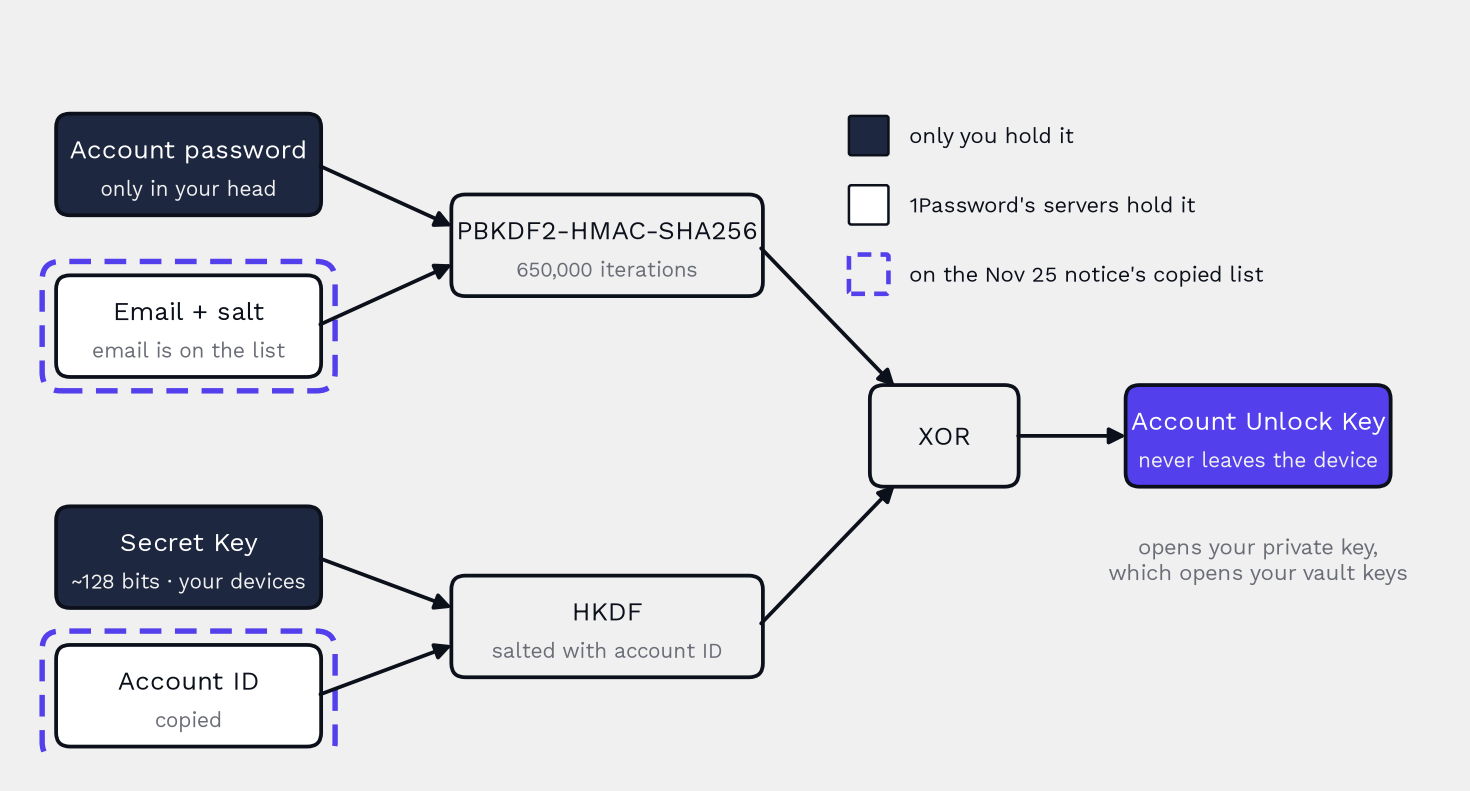 The two navy boxes never reach the server. Two of the white ones are now on someone else’s disk.
I wanted to see the property, not just read about it, so I wrote it out in Python following the steps in chapter 8.2 of the white paper. This is a sketch, not 1Password’s code. The HKDF labels are my placeholders, the AES-GCM blob stands in for the encrypted keyset, and I’ve trimmed the helpers (hkdf, try_open) out of the snippet.
ITERATIONS = 650_000  # the white paper's current PBKDF2 count

def auk(password, secret_key, email, salt16, account_id):
    pw = unicodedata.normalize("NFKD", password.strip()).encode()
    salt = hkdf(salt16, email.lower().encode(), b"PBES2g-HS256")  # bind the email
    from_password = hashlib.pbkdf2_hmac("sha256", pw, salt, ITERATIONS)
    from_secret_key = hkdf(secret_key.encode(), account_id.encode(), b"A3")
    return bytes(a ^ b for a, b in zip(from_password, from_secret_key))

blob = AESGCM(auk(password, secret_key, email, salt16, account_id)).encrypt(nonce, b"my private key", None)

print("right password, right Secret Key:", try_open(password, secret_key))
print("wrong password, wrong Secret Key:", try_open("hunter2", wrong_sk))
print("RIGHT password, wrong Secret Key:", try_open(password, wrong_sk))
one derivation: 0.09 s
right password, right Secret Key: opens
wrong password, wrong Secret Key: fails
RIGHT password, wrong Secret Key: fails
That last line is the whole design. Give an attacker every byte the server holds, and the correct password still fails exactly like a wrong one. He can’t even tell when he’s guessed right. The white paper has a story about this with a villain called Oscar, who “cannot even begin to launch a password guessing attack.”
Compare that to the normal web service, which stores a password hash. Steal the hash table and you go home and crack it. 1Password’s own estimate is that an optimized attacker pays $30 to $40 for 2³² guesses against PBKDF2 at 650,000 iterations. That’s cheap. It’s only irrelevant because the Secret Key adds roughly 128 bits on top, and nobody is guessing 128 bits for any price.
So for the data sitting on their servers, “your vault is safe” isn’t a PR line. It’s arithmetic a copy of the database can’t undo. Trust me is not an architecture. This is one.
The mailroom is built differently
Now look at the rows in that table that aren’t keys.
Invitations and account recovery are the places where the system has to talk to a human who doesn’t have their Secret Key handy. So they go by email. An emailed link carries a token. The token alone doesn’t get you in. You also need an SSO sign-in or, before this week, a six-digit code sent to the same inbox.
The attacker took the tokens. 1Password says only a small number of users were mid-invitation or mid-recovery, they’ve been notified, and there’s no sign any token was used. Then they lengthened the code from six digits to ten alphanumeric characters.
That change says more than the rest of the notice. Here’s what it buys, next to the Secret Key:
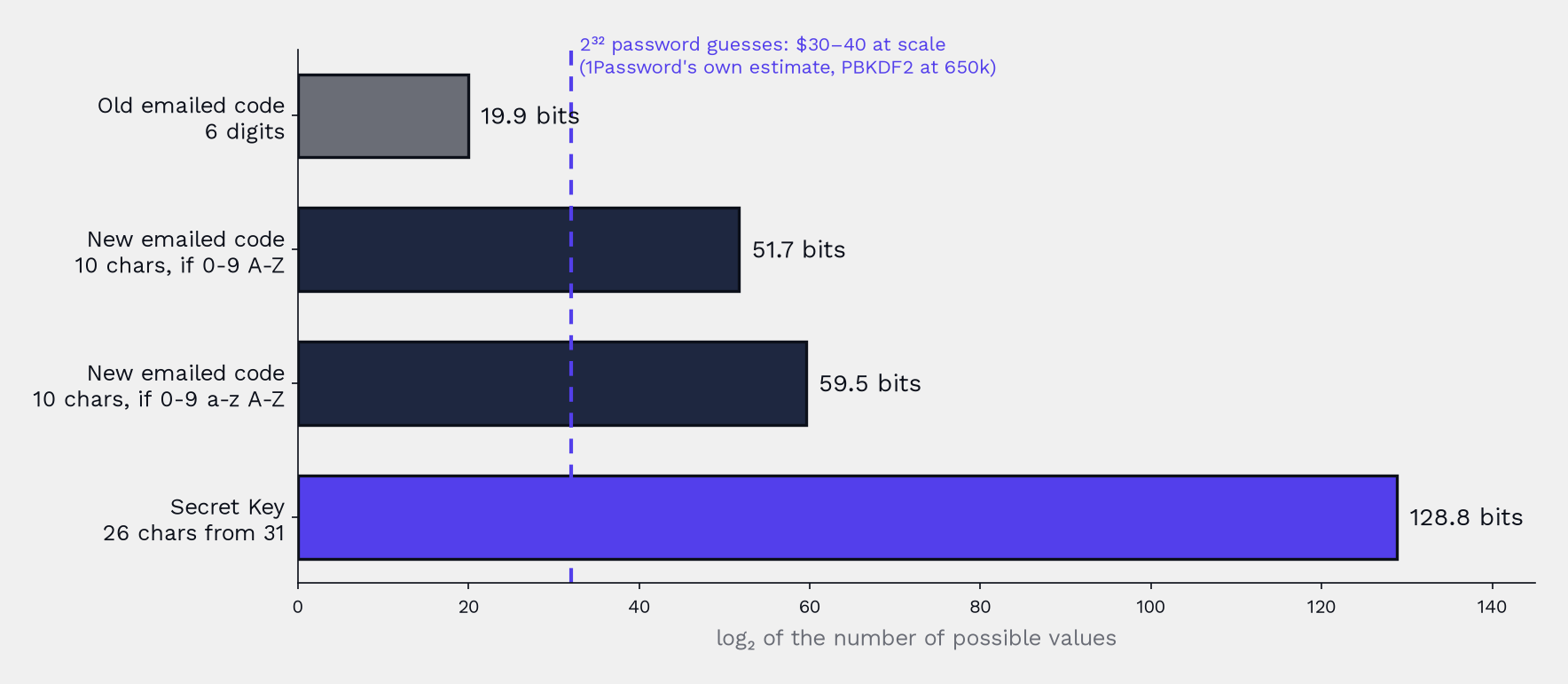 The notice doesn’t say which alphabet the new code uses, so both are shown. Emailed codes are guessed online, against rate limits. The 2³² line is offline password cracking. Different fights, same ruler.
A six-digit code is about 20 bits. That’s fine as long as the server rate-limits guesses and the code dies quickly. It’s not something you want sitting next to a stolen token. The vault never depended on 20 bits of anything. The mailroom did.
None of this is news to 1Password. Their white paper has an appendix called “Beware of the leopard” that lists where the real security falls short of what users assume. Two entries read differently this week:
- A.12, Use of email. Invitations and recovery go by email, so admins should confirm with recipients “through means other than email.”
- A.1, Crypto over HTTPS. The web client is JavaScript fetched from their servers. “An attacker capable of changing the web client on the server could deliver a malicious client to the user.”
I want to be careful here. The notice says the malicious code downloaded account data. It does not say the web client was changed, and I have no evidence it was. But “pushed malicious code to backend services” is exactly the shape of risk A.1 describes. The notice names the apps and browser extensions as unaffected. It doesn’t mention the web client either way. That’s the one question I’d like them to answer in the follow-up.
What I’m actually doing
Not much, which is the point of good architecture. But not nothing.
- Treat every 1Password email as hostile for a while. The attacker has names, emails, and the knowledge that you’re a customer. An “unexpected invitation” or “recovery request” email is the obvious next move. 1Password says the same thing.
- Type my password into the app, not a web page. Their own leopard appendix recommends native, code-signed clients over the web client. I’m following my vendor’s advice for once.
- Check the iteration count on old accounts. Per a footnote in the white paper, accounts created before January 27, 2023 that never changed their password or Secret Key still use a lower PBKDF2 count. Changing either one brings it up to 650,000. If your account is that old, this is a five-minute job.
- Find the Emergency Kit. The Secret Key is the thing doing the heavy lifting in every paragraph above. Know where your copy is.
The win here is the boring one. One GitHub account was enough to get malicious code into a password manager’s backend, and the vault still held, because it was built on the assumption that one day someone would get into the backend. The mailroom wasn’t. It’s getting longer codes now.
I’d like the next notice to say whether the web client was touched. Until then, I’m opening the app myself.